 Catarina Catarina
A free browser extension that spots email addresses, phone numbers, card numbers, ID numbers and API keys in your message before you send it to ChatGPT, Claude or Gemini, and swaps them for placeholders in one click.
Add to Chrome — it’s freeFree · No account · Nothing leaves your browser
Already told your AI too much? Scan your chat history, no install →
Using Claude Code, Cursor or a skill file? Check it in your browser, no install →
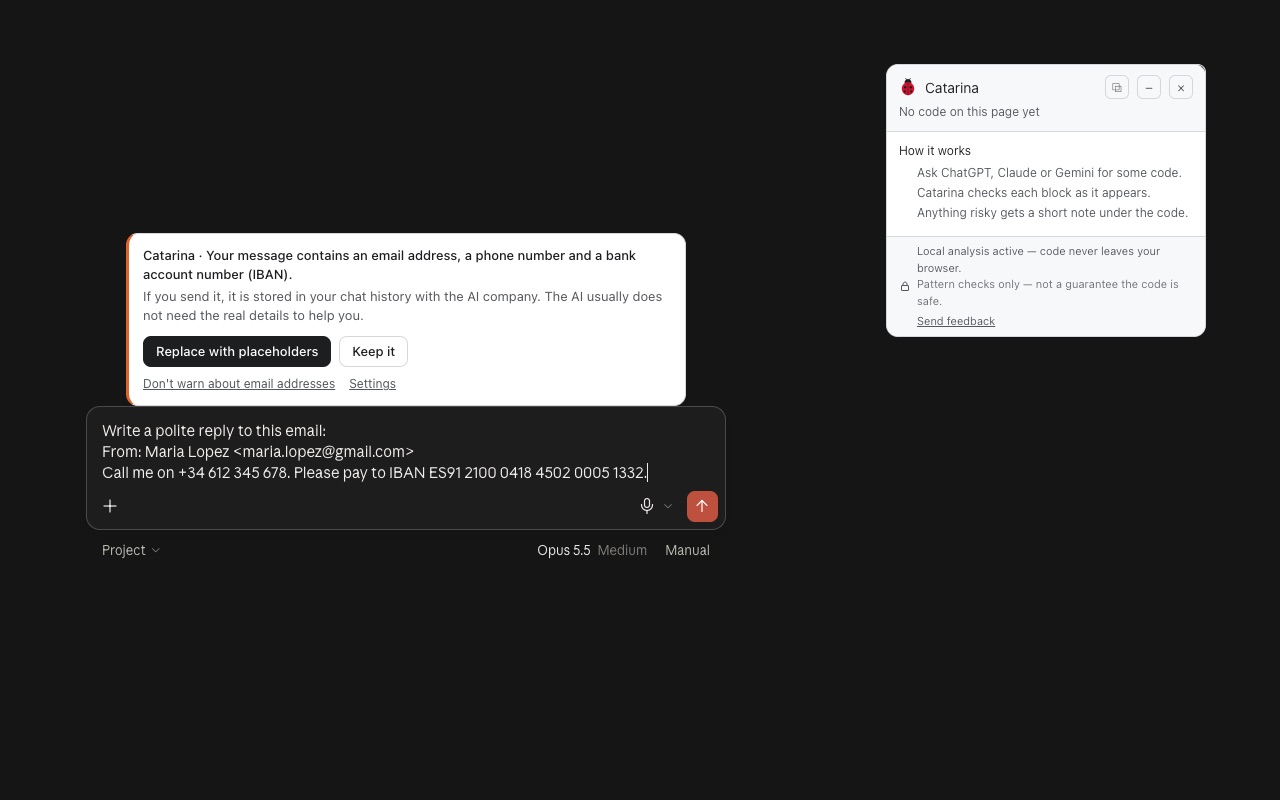
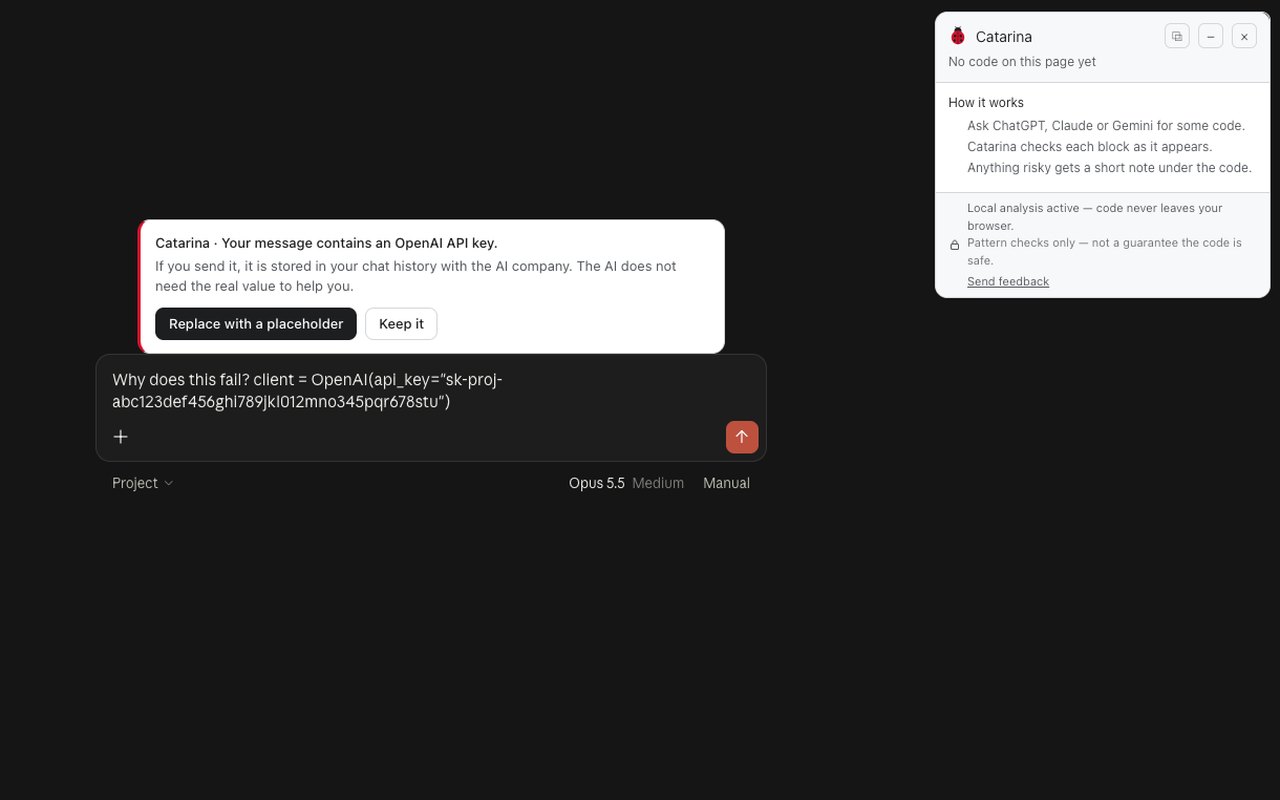
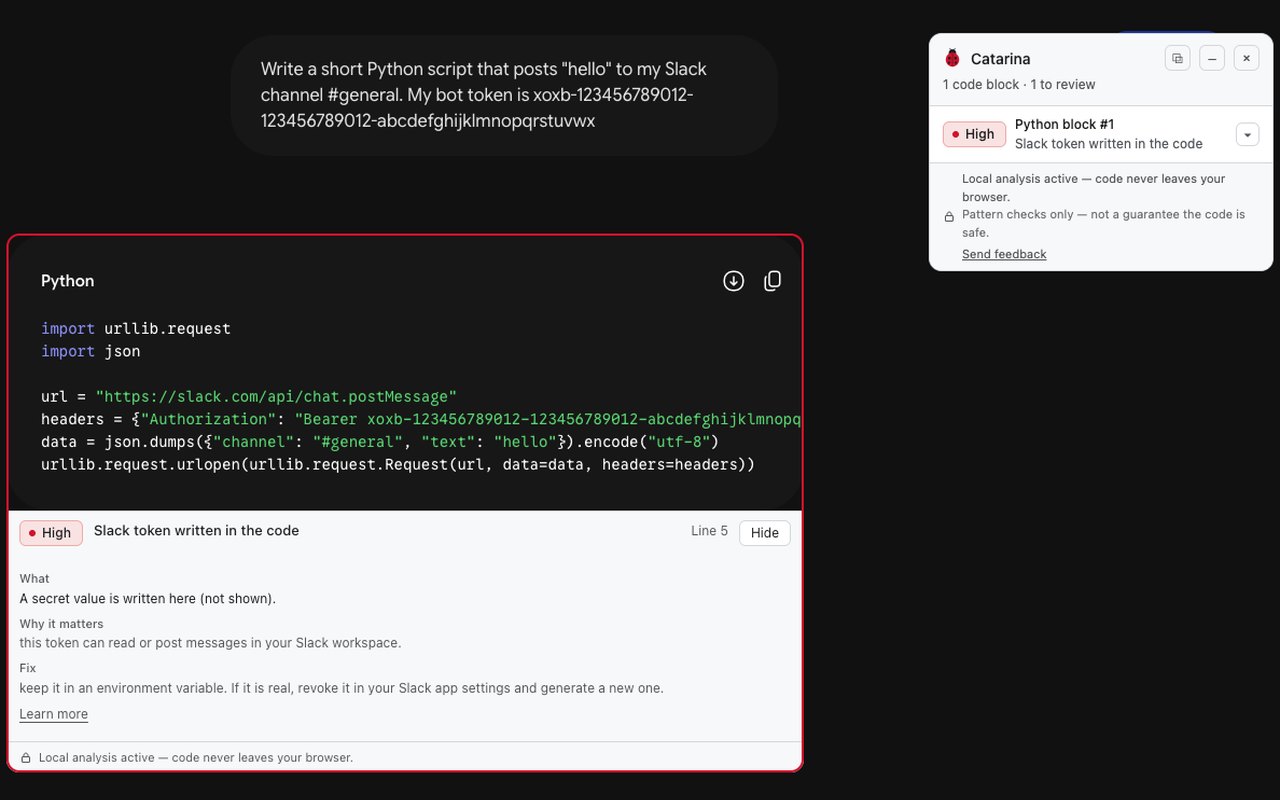
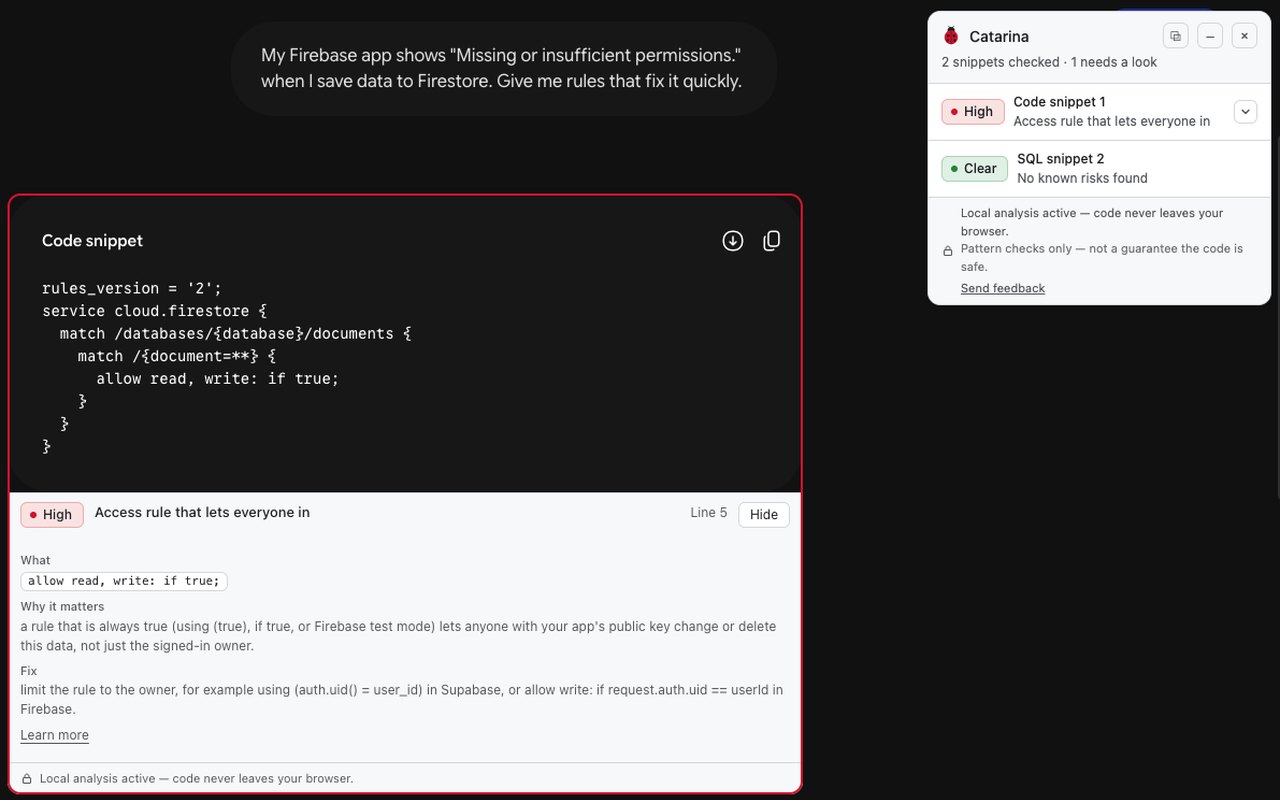
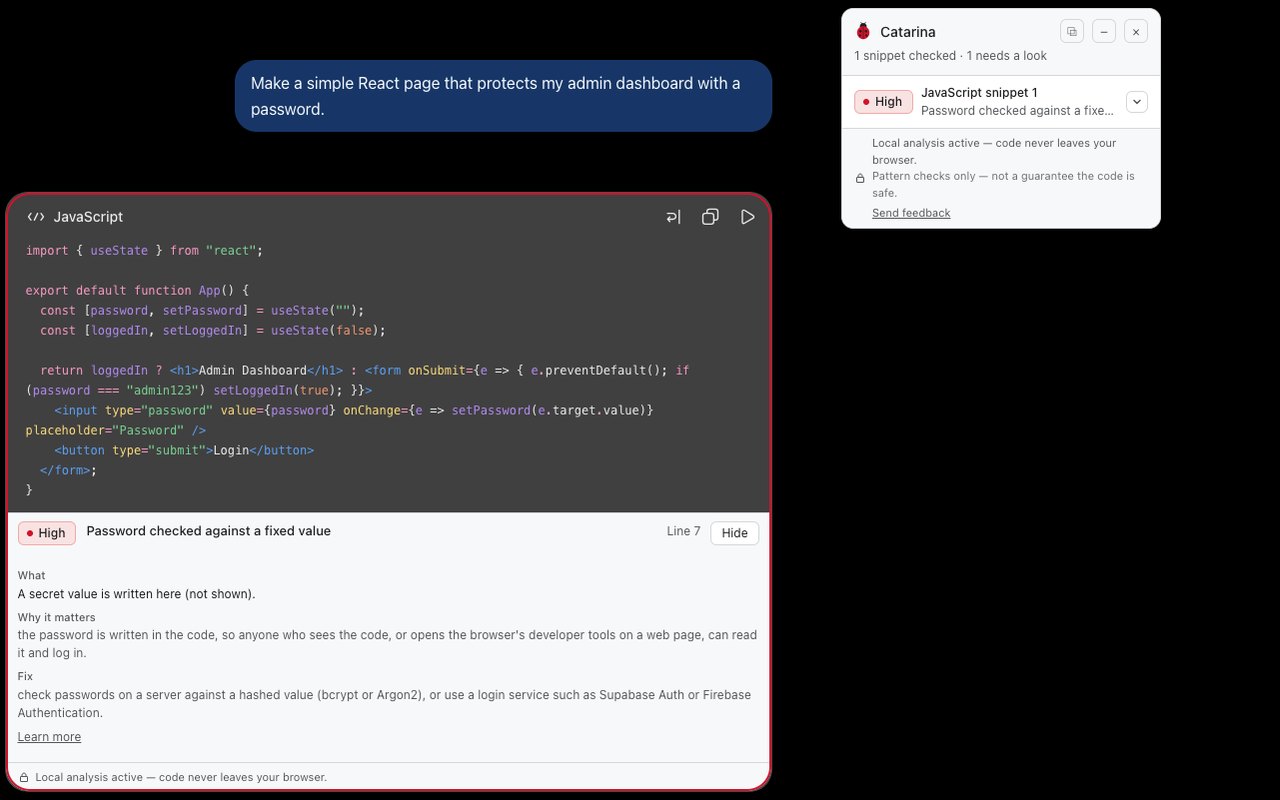
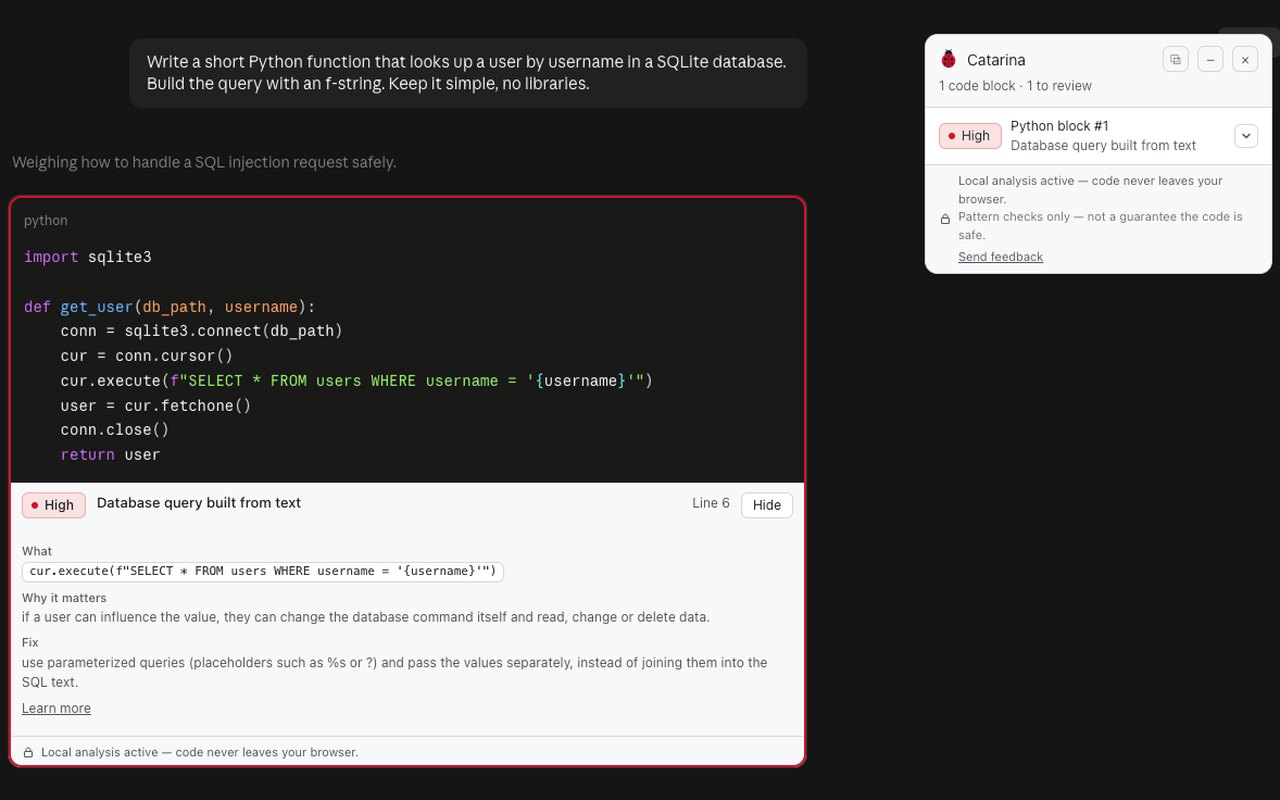
Real screenshots. Pick one to see what Catarina caught:
Before you send
It's easy to paste more than you meant to: a client's phone number in a forwarded email, a card number in an invoice, an API key in a config file. The AI usually doesn't need the real details to help you. Catarina checks your message as you write and offers to replace them with placeholders. You can always send it anyway.
Email addresses, phone numbers in international and national formats, and public IP addresses. Example addresses like you@example.com are left alone.
Card numbers and IBANs, checked with their built-in check digits, so order numbers and random digits don't set it off.
From India, Brazil, Mexico, Spain, Portugal, France, Italy, Germany, the Netherlands, Canada, the US and the UK, with check digits where the format has them.
API keys, tokens and passwords from AWS, GitHub, OpenAI, Anthropic, Slack, Stripe, Google, Azure and more.
It doesn't catch names, street addresses or health details. Email warnings can be switched off in one click, if you often share your own address.
After the AI answers
Ask an AI assistant for a quick fix and you'll usually get one. Sometimes that fix is a key pasted into the script, a database rule that lets anyone in, or a safety check switched off to make an error go away. It works today, so nothing tells you to look twice.
of developers don't fully trust AI‑generated code. Only always check it before committing.
1 in 3
AI-generated code samples could be fully exploited by an attacker, in tests of 27 leading AI models.
IOActive · May 2026 ↗2×
Commits written with Claude Code, an AI coding assistant, leaked passwords and API keys twice as often as average: 3.2% vs 1.5%.
GitGuardian · State of Secrets Sprawl 2026 ↗Catarina is that missing check: it reads every snippet in your chat and flags the risky ones before you copy them.
Catarina is not affiliated with the organisations cited.
How it works
It takes a few seconds and needs no sign-up.
In ChatGPT, Claude or Gemini, Catarina checks your message before you send it. When the AI writes code, every snippet gets a colored outline: green when nothing was found, amber or red when something deserves a look.
Replace personal data with placeholders in one click, or keep it. Open a flagged snippet to see the line, why it matters and how to fix it.
What it catches in code
API keys, tokens and passwords written straight into a script, including keys from AWS, GitHub, OpenAI, Anthropic, Slack, Stripe, Google and Azure. Also in a message you are about to send.
Supabase tables without row level security, and Supabase or Firebase rules that let anyone read or change your data.
A password compared in the web page itself, where anyone can read it.
Database queries and shell commands built by gluing in what a visitor typed.
Text from a visitor shown on a page or written to logs as-is, so a crafted link could run a script in other people's browsers or fake log entries.
Disabled certificate checks, outdated hashing and encryption, open CORS and commands that delete data.
Works best with Python, JavaScript and SQL. Java and C# are checked as well. Each finding links to its public definition (CWE).
No install needed
Paste code, a setup script or an AI skill file (SKILL.md), or open the file. It also catches commands that download and run a script, and invisible characters that can hide instructions.
Runs in your browser. Your code is never uploaded.
Check your codePrivacy
Catarina runs entirely in your browser. It doesn't use AI, it doesn't send your messages, code or chats anywhere, and there's no account, tracking or analytics. You can read exactly what it stores in the privacy policy.
Questions
Yes. There's no paid plan and no account to create.
No. All checks run on your own computer. Catarina makes no network requests and doesn't use AI.
Only if you click “Replace with placeholders”. Otherwise it just shows a note, and you can send the message as it is. It never changes the AI's code either: it explains the fix and you decide.
No tool does. Catarina recognizes patterns. It doesn't catch names, street addresses or health details, and in code it can't see mistakes in your server logic or problems that span several files. No warning means nothing was recognized, not that a message or a snippet is guaranteed to be safe.
Yes. Click “Don't warn about email addresses” in the note, or switch it off in Settings. You can also switch off the personal-data check entirely.
On chatgpt.com, claude.ai and gemini.google.com, in Google Chrome.
It costs nothing, and it might keep a card number or a key out of your chat history.
Add to Chrome — it’s free